

Enterprise AI tools like Microsoft Copilot, Glean, Onyx and the like are becoming popular in organizations of all sizes. These RAG-based systems can answer questions, summarize content, and pull insights from massive document repositories.
However, they have trouble processing images and scanned documents because these types of data is often unsupported by the embedding models used in RAG pipelines (for semantic similarity search).
Many enterprises have decades of knowledge locked away in these formats. Scanned paper documents, legacy PDFs with weird layouts, technical drawings, archives from before anyone cared about “digital workflows.”

These documents often contain sensitive info - contracts, medical records, financial statements, internal reports. Shipping them off to a third-party OCR API is a no-go from a compliance perspective. HIPAA, GDPR, and internal data governance policies often mean you simply can’t send this data outside your infrastructure. Self-hosting OCR models becomes the only viable option. Traditional OCR doesn’t quite help here.
Multi-column layouts get merged into gibberish, tables lose their structure completely, and PDFs with invisible layers or annotations become unreadable. So you end up with valuable knowledge that might as well not exist, because your RAG system can’t see it.
Enter DeepSeek-OCR #
DeepSeek OCR is a different beast from traditional OCR. Instead of the traditional sequential pipeline, it uses a vision-language model that understands a document as a whole - recognizing text, structure, and context simultaneously. This means multi-column layouts stay intact, tables preserve their structure, and the model outputs clean markdown that’s ready for RAG systems.
It also does context-aware text recognition. When text is illegible from ink stains or poor scanning quality, it infers the most likely word from context rather than outputting gibberish. For instance, in a damaged contract reading “The party agrees to ##### the premises by December 31st”, traditional OCR might return random characters, but DeepSeek OCR correctly infers “vacate” from the legal context.

Traditional OCR’s sequential five-stage pipeline - preprocessing, detection, layout analysis, recognition, and language correction - compounds errors and often loses structure. DeepSeek OCR replaces this with a unified vision-language model that processes text, structure, and context simultaneously, outputting RAG-ready markdown.
The model itself is great, but there’s a challenge: processing enterprise document archives with hundreds of thousands of pages on a single GPU would take weeks. You need a way to scale this efficiently across multiple machines.
Batch inference with SkyPilot Pools #
To process large document archives efficiently, you need a scalable batch inference system. Most organizations already have GPU capacity scattered across their infrastructure - reserved instances on AWS, managed Kubernetes clusters from Neoclouds, such as Nebius and Coreweave, maybe some credits on GCP. These GPUs often sit idle between training runs or serving workloads. SkyPilot’s Pools feature lets you harness all of this capacity together, creating a unified pool of workers that spans multiple clouds and Kubernetes clusters.
With a pool of workers, you can spin off a large amount of batch inference jobs and utilize all the GPUs available from any of your infrastructure.

The naive approach: single GPU processing
You could start by running OCR on a single GPU instance. Here’s a simple SkyPilot task that processes the entire Book-Scan-OCR dataset (full example):
Launch it with:
Unfortunately, for enterprise document archives with hundreds of thousands of scanned pages, this approach simply doesn’t scale. You’d be waiting days or weeks for results.
This is where you need parallel batch inference across multiple GPUs to make OCR practical for large document collections.
Scaling batch inference with SkyPilot pools #
Here we’ll look into SkyPilot’s Pools feature and how it enables scalable batch inference for DeepSeek OCR. Pools let you spin up a fleet of GPU workers that stay warm and ready to process document batches in parallel.
What are pools and why use them for batch inference?
A pool is a collection of GPU instances that share the same setup - dependencies, models, datasets all installed once. They persist across jobs, so there are no cold starts or re-downloading gigabytes of model weights or datasets every time.
Key benefits for batch inference workloads:
- Fully utilize GPU capacity: Pools allow you to utilize idle GPUs available across any of your clouds or Kubernetes clusters.
- Unified queue: Submit any number of jobs - SkyPilot automatically distributes work across available workers.
- Automatic recovery: Step aside for other higher priority jobs, and automatically reschedule when GPUs become available.
- Dynamic submission: Add new jobs anytime without reconfiguring infrastructure.
- Warm workers and elastic scaling: Models stay loaded and ready - no setup delays between jobs. Scale workers up or down with a single command.
It’s like having your own batch inference cluster that you control with a single YAML file, but with the flexibility to use GPUs from any provider.
Implementation: batch OCR pipeline #
Let’s build a production-ready OCR pipeline for the Book-Scan-OCR dataset of scanned news and book pages.
Step 1: pool configuration
With the new pools feature, we separate the pool infrastructure definition from the job specification. The pool YAML defines the shared worker environment (view on GitHub):
The job YAML defines the actual workload that runs on each worker (view on GitHub):
Key components
- Pool configuration (
pool.yaml): Defines the worker infrastructure and shared setup
- Job configuration (
job.yaml): Defines the workload that executes on each worker
- Separation of concerns: The pool YAML contains setup, file mounts, and infrastructure configuration. The job YAML contains only the run command and must match the pool’s resource requirements.
- Automatic work distribution: SkyPilot provides environment variables to split work across jobs
- Cloud storage integration: Results sync to S3 automatically (e.g. for use in downstream RAG systems)
Step 2: processing script
The Python script takes start/end indices and processes its chunk (view on GitHub):
Running the pipeline #
Create the pool
Spin up 3 workers with the shared environment:
SkyPilot will automatically select workers (based on availability and cost) and they can be spread across your K8s and 20+ other cloud providers for maximum flexibility. If you want to restrict to a specific cloud, you can add --infra k8s or --infra aws flags (replace k8s/aws with your desired provider).
Output:
Check pool status
See what your workers are doing:
Output:
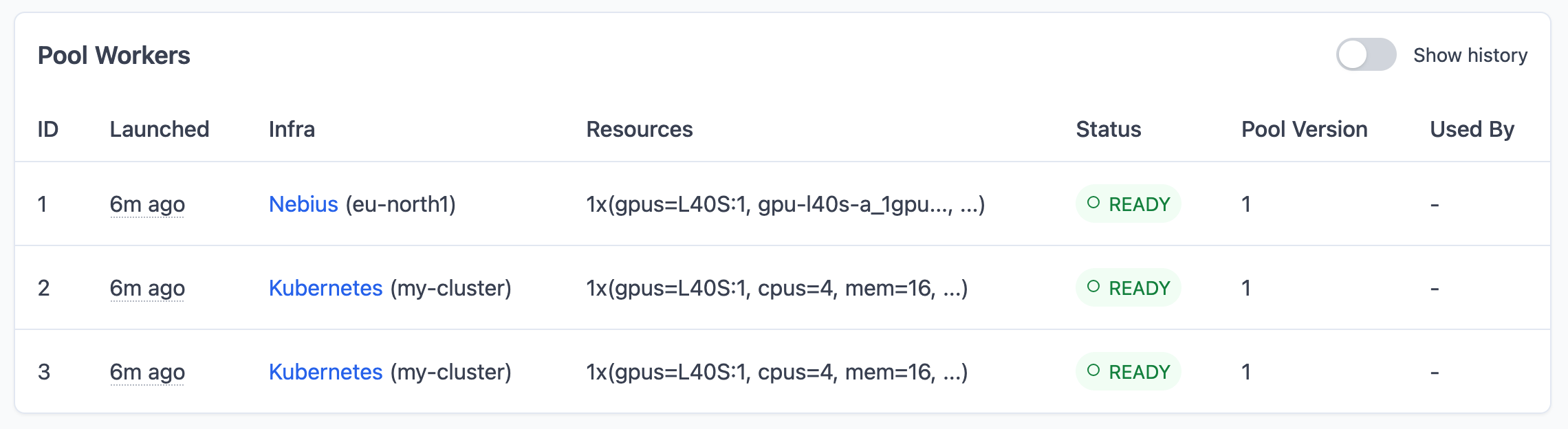
Note that I have set up access to my own K8s cluster with two L40S GPUs, Nebius cloud in Europe and AWS in US East. So SkyPilot prioritized using my K8s cluster first, then Nebius for the remaining worker because it’s cheaper than AWS (by ~$0.32/hour). As we’ll see below, if I scale up later, SkyPilot will automatically provision additional workers across different clouds to meet the desired count.
Once all workers show READY status, they’ve completed setup with models and dataset loaded.
Submit batch jobs
Submit 10 parallel jobs to process all images:
This submits 10 jobs to the pool. Since we have 3 workers, the first 3 jobs start immediately, each assigned to a worker. The remaining 7 jobs are queued and will automatically start as workers become available. Each job calculates its slice of images via $SKYPILOT_JOB_RANK, so the work gets evenly distributed across all 10 jobs.
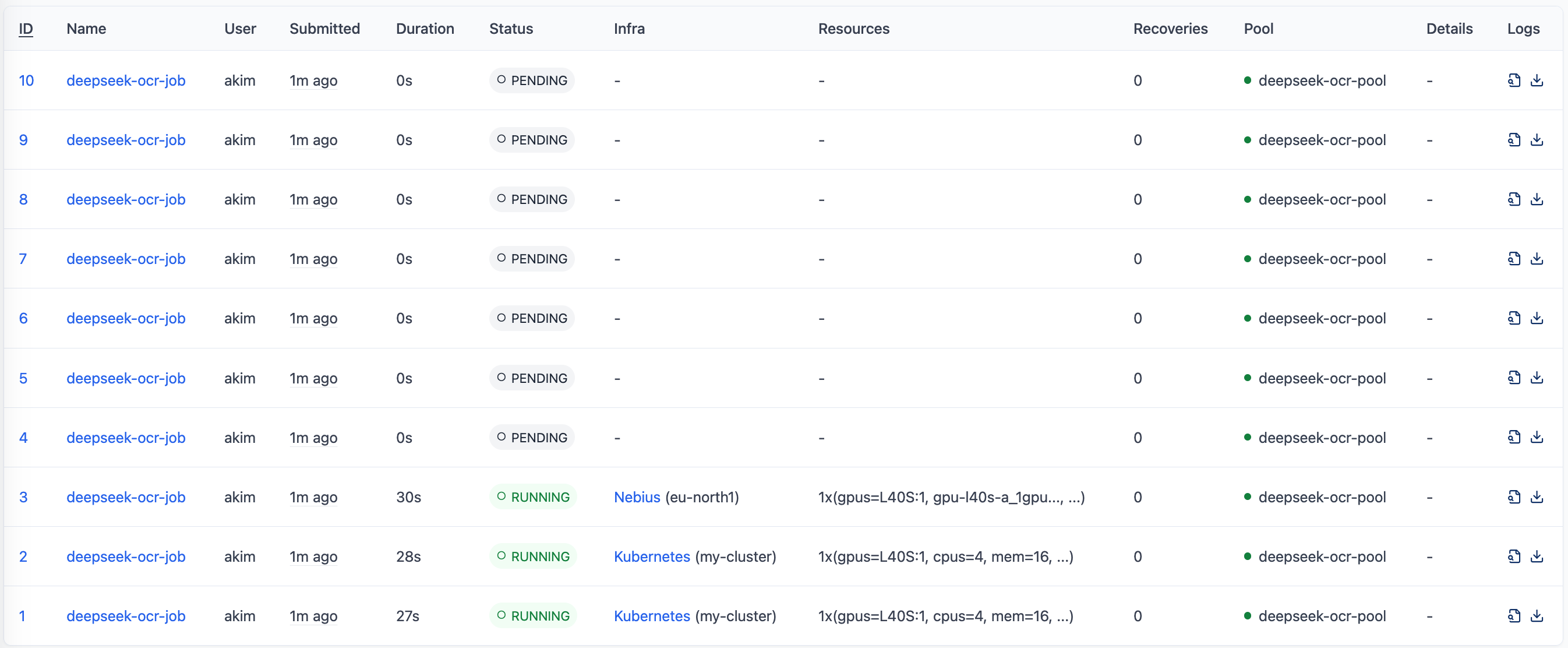
Watch progress
Check on your jobs:
Look at the logs:
Scale the pool
Want to go faster? Scale up:
If you have setup access to multiple clouds and K8s clusters, SkyPilot will automatically provision additional workers across different providers to meet your desired count. So your pool might look like this:

Then launch more jobs:
Results and integration #
Once processing finishes, your S3 bucket has all the converted documents:
Inside each directory there’s an .md file with clean markdown text ready for RAG systems. Point Glean, Onyx, or whatever pipeline you’re using at the bucket and you’re done.
Here’s an example of what the processing looks like. This scanned two-column news article:
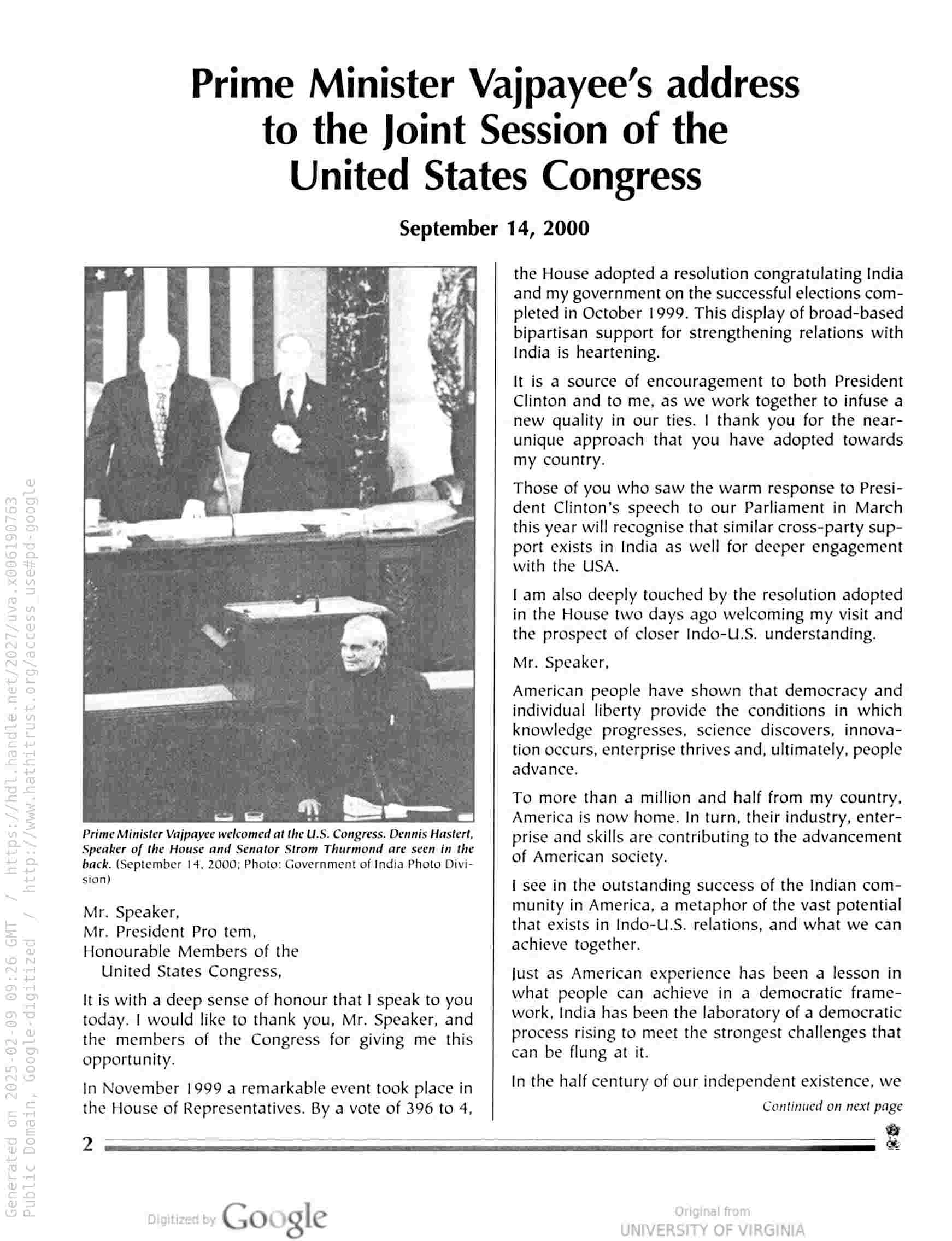
gets converted into clean and structured markdown:

Once processed, you can point your RAG system (Onyx, Glean, etc.) to the S3 bucket and start asking questions about the documents. The previously inaccessible scanned content becomes part of your searchable knowledge base. For example, asking about the sample document above:

Onyx retrieves relevant context from the resulting markdown documents to answer questions about the scanned content.

Enterprise RAG systems can access digital documents directly, but scanned documents and legacy PDFs require OCR processing first. DeepSeek OCR combined with SkyPilot’s parallel GPU workers converts these unreadable images into clean markdown format. Once processed, all enterprise knowledge becomes searchable and accessible through the RAG system for Q&A, summarization, and analysis.
Why pools work well for batch inference #
How does SkyPilot Pools compare to other batch inference approaches?
DIY scripts and SSH: You could manually partition data, SSH into each GPU node, and run jobs. This works for small runs but becomes a coordination nightmare at scale: no automatic job distribution, no failure recovery, and no visibility into what’s running where.
Kubernetes Jobs / Argo Workflows: These work well if all your GPUs are in one Kubernetes cluster. But if you have capacity spread across Hyperscalers, Neoclouds, or on-prem clusters, you’d need to manage workflows separately for each. SkyPilot unifies them into a single pool.
Cloud batch services (AWS Batch, GCP Batch): These vendor-specific services lock you into one cloud and one region. When GPU capacity runs out, you’re stuck manually reconfiguring for another region. They also require significant setup - IAM roles, compute environments, job queues, container images - before you can run anything. SkyPilot replaces this with a single YAML file that works across 17+ clouds and all regions.
Ray / Dask: Great for distributed computing within a cluster, but require you to provision and manage the underlying infrastructure yourself. SkyPilot handles both the infrastructure provisioning and the job orchestration.
The key difference: SkyPilot Pools give you a single control plane that spans multiple clouds and Kubernetes clusters, with warm workers that skip repeated setup costs. For batch inference workloads processing thousands of documents, this means higher GPU utilization and faster end-to-end throughput.
Beyond OCR: other batch inference use cases #
The same batch inference pattern with SkyPilot pools works for other embarrassingly parallel workloads:
- Large-scale model inference: Process millions of samples for classification, embedding generation, or LLM inference
- Video processing: Batch transcription, scene detection, and content analysis across video archives
- Model training: Train multiple models with different hyperparameters simultaneously
- Scientific computing: Parameter sweeps, Monte Carlo simulations, and computational experiments
- ETL pipelines: Transform massive datasets in parallel across distributed workers
Any workload that can be split into independent batches benefits from this architecture.
Wrapping up #
Modern OCR models like DeepSeek solve the document understanding problem and SkyPilot’s pools solve the batch inference scaling problem. When you combine them together, you can improve usefulness of the AI systems in your organization by providing them with additional knowledge trapped in scanned documents.
The implementation is pretty straightforward - define your batch inference environment once, submit jobs with one command, and let SkyPilot handle the orchestration across multiple clouds. If you’ve got archives of scanned documents collecting dust, this gives you a practical way to make them searchable and useful again.
Resources #
- SkyPilot Pools Documentation
- DeepSeek OCR GitHub
- Complete example code - includes
pool.yaml,job.yaml,process_ocr.py, and sample output